
How Coaches Can Get Access to Manage a MileSplit Team
Coaches can request access to manage a MileSplit team. For security, requests from non-school email addresses may require approval from an existing coach, Athletic Director, or MileSplit Support.
This helps protect athlete information while still allowing head coaches, assistant coaches, lay coaches, and school administrators to manage their teams.
Why some team claim requests require approval
Coach accounts can access athlete information, including names and dates of birth. Because of this, MileSplit does not automatically approve team claim requests from non-institutional email domains such as Gmail, Yahoo, or Hotmail.
If you do not have a school-issued email address, you can still receive team access using one of the approval options below.
How to request access to a team
- Create a free MileSplit account at MileSplit Join.
- Find your team and submit a team claim request. Follow the steps in How to Claim Your Team on MileSplit.
- Ask an existing coach or Athletic Director with team access to approve your request from the Coaches tab in Manage Team.
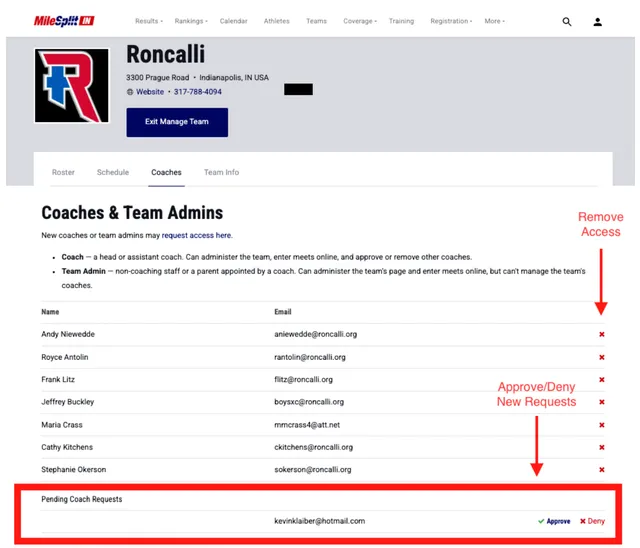
Once your request is approved, you can manage the team using your own MileSplit account.
If you do not have a school email address
Lay coaches and other coaches without a school-issued email address can be approved by an existing team administrator.
An existing coach or Athletic Director can:
- Open the team in Manage Team.
- Select the Coaches tab.
- Review pending team claim requests.
- Approve or deny a request.
- Remove coaches who are no longer with the program.
This allows the school to control who has access to its team information.
If no current coach can approve your request
If your request is pending or denied and there is no current coach available to approve it, complete the Contact Us form at support.milesplit.com.
This process can also be used when an entire coaching staff has changed and no current coach has access to the team.
Can multiple coaches manage the same team?
Yes. MileSplit supports access for multiple coaches and school administrators.
Head coaches, assistant coaches, and other authorized staff can each use their own MileSplit account to manage the same team. Coaches should use individual accounts instead of sharing login credentials.
Can one account manage multiple teams?
Yes. You can use one MileSplit account to manage multiple teams, such as:
- High school teams
- Middle school teams
- Elementary
- Unified teams
- Club teams
You do not need to create a separate MileSplit account for each team.
How to find the teams you manage
To view the teams connected to your account, open your account menu and select My Athletes & Teams.
All teams you have permission to manage will appear there.