
Approved coaches can add athletes to their MileSplit team roster individually or use Import Roster to add multiple athletes at once.
Add an athlete
- Go to your MileSplit team page.
- Select the blue Edit Team button at the top of the page.

3. Select the Roster tab.
4. Find Add Athlete on the right side of the roster page.
5. Enter the athlete's:
- First name
- Last name
- Gender
- High school graduation year
- Select each season in which the athlete will compete.
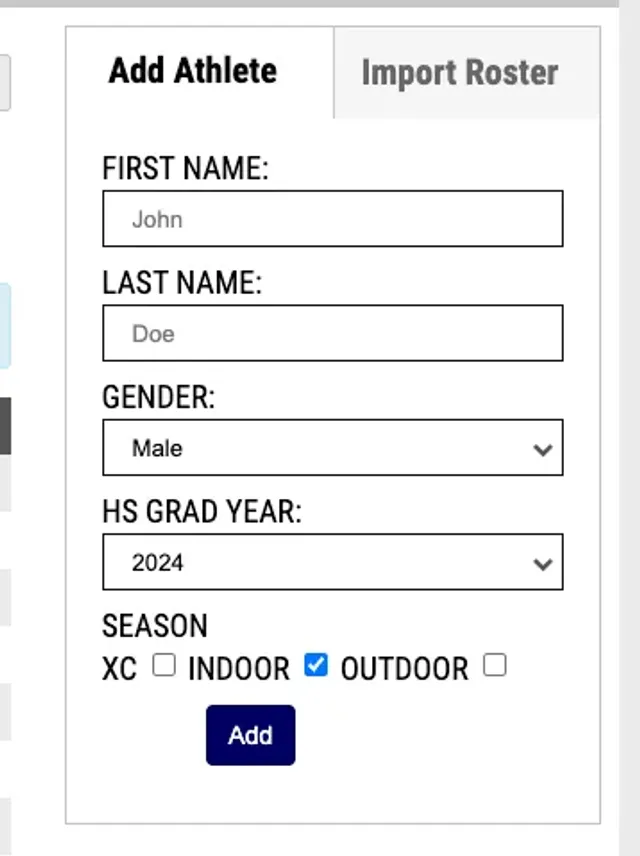
6. Select Add.
7. Repeat these steps for each additional athlete.
Import multiple athletes
If you need to add a large number of athletes, use the Import Roster option instead of entering each athlete individually.
Download the roster import template and complete the required fields:
- Last Name
- First Name
- HS Grad Year
- Gender, entered as M or F
Other fields in the template are optional.
Review the athlete information for accuracy before importing your roster.