For cross country meets, FinishLynx can serve as the live database for results. When configured correctly, MS Live can read FinishLynx LIF updates in real time, allowing scoring and tie-breaking to be handled directly within MS Live.
Configure this connection before the meet and test it with sample data to ensure athletes, finishes, and scoring update correctly during competition.
Prepare your FinishLynx setup
Before connecting FinishLynx to MS Live, confirm your setup includes the required meet data.
Review:
- Athlete information
- Team information
- Race assignments
- Bib numbers or other identifiers used in your timing workflow
- Finish data configuration
Enable LIF AutoSave in FinishLynx
FinishLynx must be configured to continuously update LIF files.
- Open FinishLynx.
- Access hidden settings:
- Go to File
- Hold CTRL + SHIFT and click Options
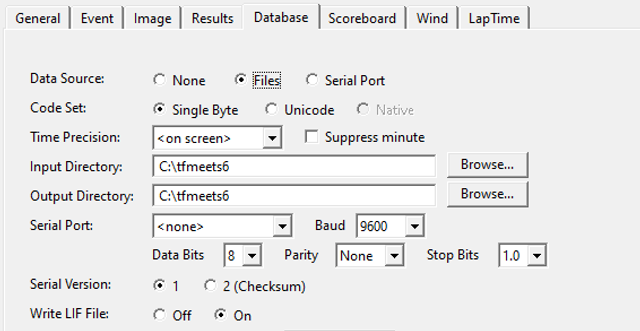
- Expand Database.
- Expand LIF.
- Select AutoSave.
- Enter an interval (in seconds) for automatic updates to the LIF file.
- Minimum value: 1 second
This ensures MS Live receives frequent updates during the meet.
Configure FinishLynx file location
- Locate your FinishLynx database directory containing the .LIF and .EVT files.
- Confirm the Input Directory and Output Directory are the same.
- Ensure Write LIF File is set to On.
This allows MS Live to consistently read the most current data.
Connect FinishLynx to MS Live
- Open MS Live.
- Select the meet you are using.
- From the Database Location dropdown, select FinishLynx.
- Browse to the same Input/Output directory used in FinishLynx.
- Click Start Publishing.
MS Live will now begin reading updates from the FinishLynx LIF files as they are generated.
Test the connection
Before the meet begins:
- Confirm athletes appear correctly in MS Live
- Verify finish data updates in real time
- Check that team scoring updates correctly
- Confirm tie-breaking behavior works as expected
- Validate that race assignments match FinishLynx
If data does not update correctly
Check the following:
- LIF AutoSave is enabled and set to a valid interval
- Input and Output directories match in FinishLynx
- Write LIF File is turned On
- MS Live is pointed to the correct directory
- The correct meet is selected in MS Live